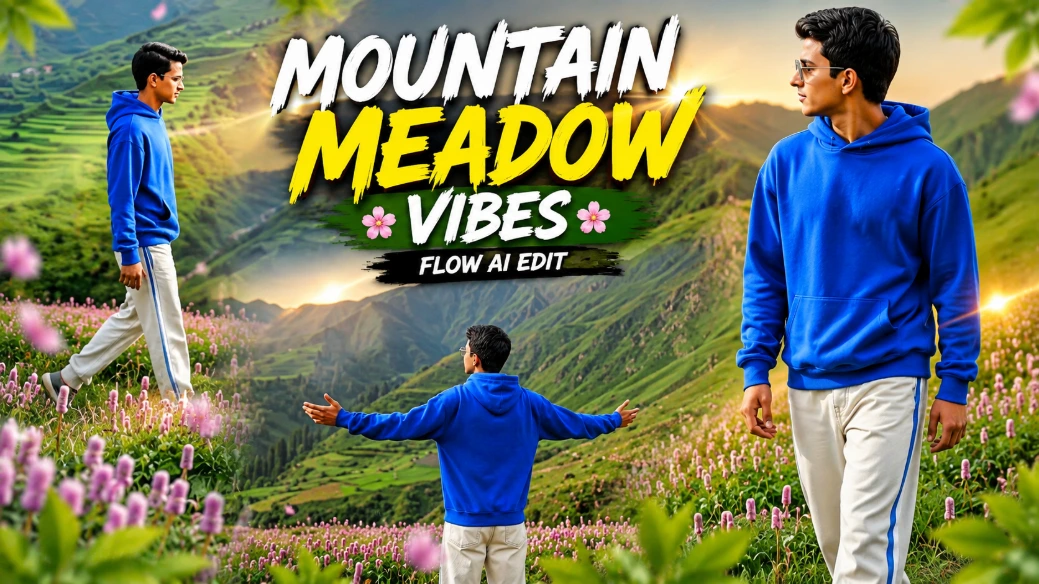
This beautiful Mountain Meadow AI Video Prompt is perfect for creating stunning cinematic nature videos using Google Flow AI. Transform your ordinary photograph into a breathtaking mountain experience surrounded by colorful purple and pink wildflowers, lush green hills, and beautiful natural scenery.
This professional Flow AI video prompt is designed for creators who love cinematic video editing, realistic DSLR visuals, mountain photography, and aesthetic nature reels. The video features a beautiful hillside meadow filled with blooming flowers, green terraced mountain slopes, winding trails, and a charming cottage in the distance.
The main highlight of this AI video concept is its natural cinematic atmosphere. Bright daylight, balanced exposure, vibrant colors, and beautiful foreground flower bokeh create a professional photography appearance. The mountain landscape provides a peaceful and visually attractive background for your personal cinematic video.
You can use your own photograph as the main character reference. The prompt includes strict face identity instructions to preserve your original facial features, eyes, nose, lips, jawline, hairstyle, and natural skin tone. This helps maintain your identity throughout the generated video. For better results, upload a clear photograph with good lighting and a properly visible face.
The outfit includes a royal-blue oversized hoodie, relaxed off-white wide-leg jeans with blue accent stripes, and black-and-white sneakers. The same outfit is maintained throughout the video to create a consistent appearance.
The mountain meadow environment is designed with beautiful purple-pink flowers, rich green mountain scenery, and soft natural daylight. The background includes distant hillside trails and a small red-and-white cottage, giving the video a realistic outdoor photography atmosphere.
The video features different natural poses and camera perspectives, including walking through flowers, sitting on the meadow, looking toward the mountain valley, standing with crossed arms, and enjoying the beautiful landscape with open arms. These movements help create an engaging cinematic experience.
The professional visual style includes 8K UHD quality, HDR-inspired color grading, smooth slow-motion movement, natural skin tones, and DSLR-style depth of field. The bright exposure keeps the face visible while the colorful flowers and green mountain background make the video visually attractive.
This prompt is suitable for Instagram Reels, Facebook Reels, YouTube Shorts, and other social media platforms. Content creators can use this concept to make attractive AI-generated nature videos without arranging an actual mountain photoshoot.
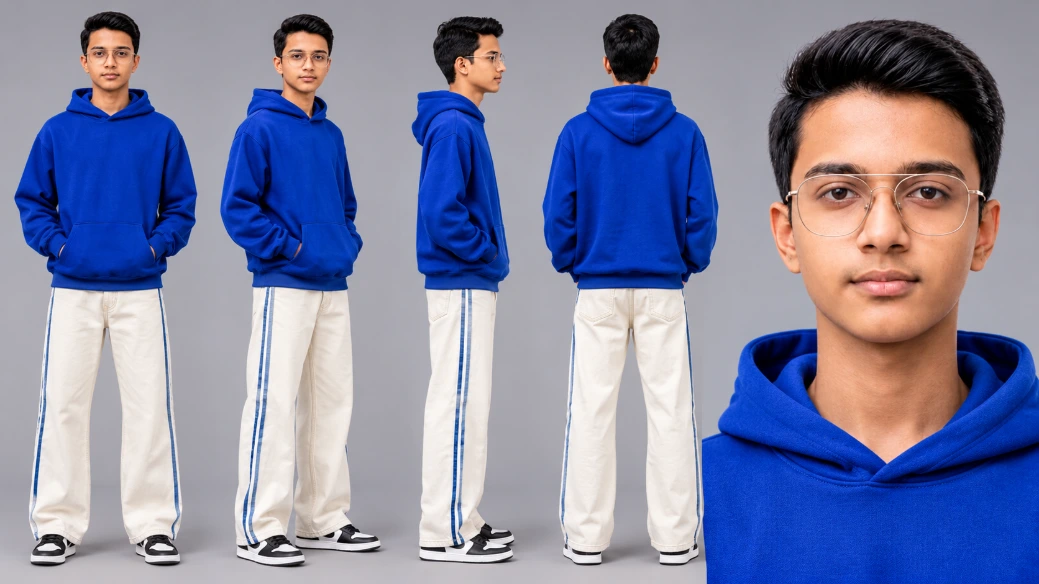
For the best character consistency, first create a character reference sheet using ChatGPT. Upload your photograph to ChatGPT and generate a character model sheet with your original facial identity, hairstyle, and outfit. Save the generated reference image for use in your video creation workflow.
After preparing your character sheet, open Google Flow AI and upload your clear photograph or suitable character reference. Copy the complete video prompt from this page and paste it into Flow AI. Select the available video generation settings and generate your cinematic mountain video.
Once your video is ready, preview the result and check the face, clothing, background, and movements. You can make another generation if you want to improve the result. Download the final video and use VN Editor or CapCut for additional editing, music, and finishing touches.
Whether you are a beginner or a professional AI video creator, this Mountain Meadow Video Prompt provides a creative way to turn your photograph into a beautiful cinematic nature video.
Visit aialfaiz07 for more AI photo prompts, Flow AI video prompts, ChatGPT character sheet prompts, and professional AI editing tutorials. Explore new creative ideas and make your own cinematic videos with AI.
✦
✦
Sabse Pehle ChatGPT Ki Madad Se Character Sheet Ready Karein
✦ AI PHOTO PROMPTAialfaiz07
Character Sheet Prompt
Cinematic character turn-around model sheet, ultra-realistic 8K UHD, neutral grey studio backdrop, 16:9 aspect ratio.
[STRICT FACE LOCK & IDENTITY]
Lock 100% exact facial geometry, eyes, nose, lips, jawline, hairstyle, and natural skin tone from the uploaded reference photo across all views. Completely bareheaded, smooth, clean, blemish-free DSLR skin texture with natural pores; zero morphing, zero distortion, face evenly illuminated with bright, clear studio fill lighting and zero dark shadows in every angle.
[OUTFIT & STYLING SPECIFICATIONS]
- Top: Royal-blue oversized pullover hoodie with clean minimalist finish and natural heavy cotton drape.
- Bottom: Relaxed wide-leg off-white/light-cream denim jeans featuring subtle blue vertical accent stripes running down the outer side seams.
- Footwear: Classic black-and-white sneakers with crisp white soles.
- Wardrobe and styling remain 100% consistent and identical across every view.
[MULTI-VIEW MODEL SHEET COMPOSITION]
Full-body multi-angle character reference sheet arranged side-by-side in a single clean frame:
1. Full Front View: Standing relaxed, arms naturally at sides, direct eye contact with camera, calm confident posture, displaying the royal-blue oversized pullover hoodie and wide-leg off-white denim jeans.
2. 3/4 Profile Angle: Turned at 45 degrees showing side jawline, oversized hoodie sleeve drape, outer-leg blue vertical accent stripes on the cream jeans, and black-and-white sneakers.
3. Profile View (90°): Clean side-profile shot displaying clear facial contour, hairstyle silhouette, hoodie hood resting on shoulders, full side view of the blue vertical stripe detail along the trouser leg, and sneaker profile.
4. Back View: Direct rear angle displaying the back of the royal-blue pullover hoodie, backward shoulders, and wide-leg cut of the off-white denim jeans.
5. High-Detail Close-Up Headshot: Ultra-sharp 4K portrait highlighting natural eyes, skin pores, jawline, hairstyle, and royal-blue hoodie collar/hood detailing under balanced softbox studio lighting.
[TECHNICAL SPECS & QUALITY]
High-end commercial streetwear lookbook catalog, shot on 85mm f/1.4 lens, softbox three-point studio illumination, hyper-detailed heavy fleece cotton texture, structured off-white denim weave, and crisp sneaker details, true-to-life colors, 8K resolution.
Cinematic 16:9 widescreen 8K HDR 120fps ultra-realistic DSLR mountain meadow video optimized for Flow AI (all 12 continuous scenes compressed cleanly into a 10-second master sequence), set on a high-altitude hillside carpeted with purple-pink wildflowers overlooking lush green terraced mountain slopes, filmed under bright, soft, evenly balanced daylight with zero harsh glare and zero dark shadows on the face.
[STRICT IDENTITY & FACE LOCK]
Use the uploaded user/audience photo as the exact face reference. Lock 100% facial features, eyes, nose, lips, jawline, hairstyle, and natural skin tone across all 12 scenes. Ultra-smooth, clean, natural DSLR skin texture, zero morphing or facial drifting, face brightly illuminated and clearly visible whenever turned toward camera.
[SINGLE CONSISTENT OUTFIT (EXACT MATCH FROM VIDEO)]
Exact same outfit across all 12 scenes: royal-blue oversized pullover hoodie, relaxed wide-leg off-white/light-cream denim jeans with subtle blue vertical accent stripes along the outer legs, and black-and-white sneakers.
[LOCATION & WILDFLOWER ATMOSPHERE]
Vast mountain hilltop meadow densely covered with purple-and-pink blooming wildflowers (with soft out-of-focus foreground purple blossoms creating dreamy DSLR bokeh), massive green grassy mountain hills with winding dirt trails behind, and a small red-and-white hillside cottage on the far right under bright soft daylight.
[12 EXACT REAL-VIDEO MATCHED SCENES (PACED FOR 10s FLOW AI GENERATION)]
- Scene 1 (0:00-0:00.8 | Side-Profile Ridge Walk): Wide shot; walks steadily left-to-right along the purple-pink wildflower ridge with green mountain slopes behind and blurred purple wildflowers in foreground.
- Scene 2 (0:00.8-0:01.6 | Rack-Focus Meadow Sit): Soft rack-focus transition; sits relaxed on the wildflower meadow facing toward the green hills while foreground purple blossoms blur softly.
- Scene 3 (0:01.6-0:02.5 | Frontal Wildflower Walk): Medium-wide front shot; walks slowly forward through purple wildflowers with hands relaxed and head tilted slightly down, face clearly lit and sharp.
- Scene 4 (0:02.5-0:03.3 | Side-Profile Valley Gaze): Medium side-profile shot; stands facing left looking peacefully across the green mountain valley with clean jawline definition.
- Scene 5 (0:03.3-0:04.1 | Arms-Crossed Thoughtful Stand): Medium shot; stands in the wildflower meadow with arms crossed over chest and head tilted thoughtfully downward, face brightly exposed.
- Scene 6 (0:04.1-0:05.0 | Lower-Body Forward Stride): Low-angle medium shot; steps calmly forward through blooming purple-pink wildflowers showing blue hoodie hem and wide-leg blue-accented white jeans.
- Scene 7 (0:05.0-0:05.8 | Over-Shoulder Mountain Sit Close-Up): Close-up back-three-quarter shot; sits on the grassy slope gazing out toward towering green mountain ridges against bright sky.
- Scene 8 (0:05.8-0:06.6 | Back-View Horizon Stand): Medium-wide back shot; stands calmly among purple wildflowers looking out over the vast green hillside.
- Scene 9 (0:06.6-0:07.5 | Arms-Crossed Hillside Reflection): Medium-wide shot; stands with arms crossed tightly across chest looking downward and left against lush terraced mountain slopes.
- Scene 10 (0:07.5-0:08.3 | Wide Meadow Turn & Stroll): Wide scenic shot; turns smoothly and walks across the expansive purple wildflower field with green hills and distant hillside cottage behind.
- Scene 11 (0:08.3-0:09.1 | Open-Arms Freedom Pose): Wide back-three-quarter shot; stands facing the grand green mountain slope with both arms spread wide open in a carefree, liberated gesture.
- Scene 12 (0:09.1-0:10.0 | Final Back-View Wildflower Walk): Medium-wide back tracking shot; walks calmly away through the purple-pink wildflower meadow toward the green hillside before smooth fade-out.
[COLOR & TECHNICAL]
Ready-to-use commercial DSLR daylight color grading: vibrant natural purple-pink wildflowers, rich emerald-olive mountain greens, luminous natural skin tones, open lifted midtones and shadows with zero darkness or black crush on face, 8K prime lens optics, creamy foreground flower bokeh, 120fps fluid slow-motion cadence, 16:9 widescreen ratio. Subtle static watermark 'Aialfaiz07' positioned cleanly in the bottom corner.
✦ FLOW AI VIDEO PROMPTAialfaiz07
Cinematic Video Prompt
Cinematic 16:9 widescreen 8K HDR 120fps ultra-realistic DSLR mountain meadow video optimized for Flow AI (all 12 continuous scenes compressed cleanly into a 10-second master sequence), set on a high-altitude hillside carpeted with purple-pink wildflowers overlooking lush green terraced mountain slopes, filmed under bright, soft, evenly balanced daylight with zero harsh glare and zero dark shadows on the face.
[STRICT IDENTITY & FACE LOCK]
Use the uploaded user/audience photo as the exact face reference. Lock 100% facial features, eyes, nose, lips, jawline, hairstyle, and natural skin tone across all 12 scenes. Ultra-smooth, clean, natural DSLR skin texture, zero morphing or facial drifting, face brightly illuminated and clearly visible whenever turned toward camera.
[SINGLE CONSISTENT OUTFIT (EXACT MATCH FROM VIDEO)]
Exact same outfit across all 12 scenes: royal-blue oversized pullover hoodie, relaxed wide-leg off-white/light-cream denim jeans with subtle blue vertical accent stripes along the outer legs, and black-and-white sneakers.
[LOCATION & WILDFLOWER ATMOSPHERE]
Vast mountain hilltop meadow densely covered with purple-and-pink blooming wildflowers (with soft out-of-focus foreground purple blossoms creating dreamy DSLR bokeh), massive green grassy mountain hills with winding dirt trails behind, and a small red-and-white hillside cottage on the far right under bright soft daylight.
[12 EXACT REAL-VIDEO MATCHED SCENES (PACED FOR 10s FLOW AI GENERATION)]
- Scene 1 (0:00-0:00.8 | Side-Profile Ridge Walk): Wide shot; walks steadily left-to-right along the purple-pink wildflower ridge with green mountain slopes behind and blurred purple wildflowers in foreground.
- Scene 2 (0:00.8-0:01.6 | Rack-Focus Meadow Sit): Soft rack-focus transition; sits relaxed on the wildflower meadow facing toward the green hills while foreground purple blossoms blur softly.
- Scene 3 (0:01.6-0:02.5 | Frontal Wildflower Walk): Medium-wide front shot; walks slowly forward through purple wildflowers with hands relaxed and head tilted slightly down, face clearly lit and sharp.
- Scene 4 (0:02.5-0:03.3 | Side-Profile Valley Gaze): Medium side-profile shot; stands facing left looking peacefully across the green mountain valley with clean jawline definition.
- Scene 5 (0:03.3-0:04.1 | Arms-Crossed Thoughtful Stand): Medium shot; stands in the wildflower meadow with arms crossed over chest and head tilted thoughtfully downward, face brightly exposed.
- Scene 6 (0:04.1-0:05.0 | Lower-Body Forward Stride): Low-angle medium shot; steps calmly forward through blooming purple-pink wildflowers showing blue hoodie hem and wide-leg blue-accented white jeans.
- Scene 7 (0:05.0-0:05.8 | Over-Shoulder Mountain Sit Close-Up): Close-up back-three-quarter shot; sits on the grassy slope gazing out toward towering green mountain ridges against bright sky.
- Scene 8 (0:05.8-0:06.6 | Back-View Horizon Stand): Medium-wide back shot; stands calmly among purple wildflowers looking out over the vast green hillside.
- Scene 9 (0:06.6-0:07.5 | Arms-Crossed Hillside Reflection): Medium-wide shot; stands with arms crossed tightly across chest looking downward and left against lush terraced mountain slopes.
- Scene 10 (0:07.5-0:08.3 | Wide Meadow Turn & Stroll): Wide scenic shot; turns smoothly and walks across the expansive purple wildflower field with green hills and distant hillside cottage behind.
- Scene 11 (0:08.3-0:09.1 | Open-Arms Freedom Pose): Wide back-three-quarter shot; stands facing the grand green mountain slope with both arms spread wide open in a carefree, liberated gesture.
- Scene 12 (0:09.1-0:10.0 | Final Back-View Wildflower Walk): Medium-wide back tracking shot; walks calmly away through the purple-pink wildflower meadow toward the green hillside before smooth fade-out.
[COLOR & TECHNICAL]
Ready-to-use commercial DSLR daylight color grading: vibrant natural purple-pink wildflowers, rich emerald-olive mountain greens, luminous natural skin tones, open lifted midtones and shadows with zero darkness or black crush on face, 8K prime lens optics, creamy foreground flower bokeh, 120fps fluid slow-motion cadence, 16:9 widescreen ratio. Subtle static watermark 'Aialfaiz07' positioned cleanly in the bottom corner.
First, open ChatGPT on your mobile phone or computer. Upload your clear photograph with a properly visible face. Choose a good-quality image without heavy filters.
Step 2: Create a Character Sheet
Use a character model sheet prompt in ChatGPT. Ask ChatGPT to maintain your original face, hairstyle, skin tone, and clothing. Generate a consistent character reference sheet.
Step 3: Save Your Character Sheet
Once your character sheet is ready, check the face and outfit carefully. Save the generated image to your phone gallery.
Step 4: Open Google Flow AI
Now open Google Flow AI in your browser and sign in to your account. Select the available video generation option.
Step 5: Upload Your Photo
Upload your original photograph or suitable character reference image. Make sure your image is clear and properly uploaded.
Step 6: Copy the Video Prompt
Return to the aialfaiz07 website and find the Mountain Meadow Flow AI Video Prompt. Click the Copy Prompt button to copy the complete prompt.
Step 7: Paste the Prompt
Open Flow AI again and paste the copied prompt into the prompt box. Check that all instructions have been copied correctly.
Step 8: Select Video Settings
Choose the available video settings according to your requirements. Use the supported aspect ratio, duration, and quality options.
Step 9: Generate Your Video
Click the Generate button and wait for Flow AI to process your video. Generation time depends on server availability and your account credits.
Step 10: Preview Your Result
After generation, watch your video carefully. Check facial consistency, clothing, mountain background, and natural movements.
Step 11: Edit Your Video
Download your generated video and open VN Editor or CapCut. Add suitable music, adjust colors, and make final editing changes if required.
Step 12: Upload on Social Media
Your cinematic mountain video is ready. Upload it to Instagram Reels, Facebook Reels, or YouTube Shorts with an attractive caption.
That's it! You have successfully created a beautiful AI mountain video using ChatGPT and Google Flow AI.
✦
✦
✦ RELATED TAGSAialfaiz07
Flow AI Video PromptMountain Meadow AI VideoAI Mountain Video EditingWildflower Video PromptFlow AI Cinematic VideoChatGPT Character SheetAI Nature VideoMountain Cinematic EditingDSLR AI Video PromptPurple Flower VideoFlow AI Editing TutorialAI Video Generationaialfaiz07
✦ RELATED TAGSAialfaiz07
Flow AI Video PromptMountain Meadow AI VideoAI Mountain Video EditingWildflower Video PromptFlow AI Cinematic VideoChatGPT Character SheetAI Nature VideoMountain Cinematic EditingDSLR AI Video PromptPurple Flower VideoFlow AI Editing TutorialAI Video Generationaialfaiz07